FAQ’s Chedington Bicton Park Livestream

Heading image

How can I access the Chedington Bicton Park 5* Horse Trials on the IOS or Android on my phone?

You can watch the coverage via the app, however, to watch the showjumping and cross country phases you will first need to purchase a Weekend Pass via the website. Please note, you will not be able to purchase a Weekend Pass via the app.

IOS users to purchase a Weekend Pass, please uninstall your H&C+ app and make your purchase via the Elite Eventing Channel on the website. You can then then reinstall your app to watch the coverage. 

  1. Uninstall the H&C+ app
  2. Purchase your Weekend Pass via the Elite Eventing Channel on the website
  3. Reinstall the H&C+ app
  4. Watch all of the action live

Please visit the Elite Eventing Channel on H&C to purchase our Weekend Pass.

To watch the Chedington Bicton Park 5* Horse Trials on your phone or tablet, you will need to download the H&C+ app on your device. To do this, please visit the App Store to download. You will then be able to access the live stream via the Elite Eventing Channel in the drop down menu. 

*Please note, you can not purchase a Weekend Pass via the app, please make your purchase on the website

How can I access the Chedington Bicton Park 5* Horse Trials on my TV?

To watch the Chedington Bicton Park 5* Horse Trials on your TV, you will need to have one of the following devices attached to your TV:

  • Roku
  • Amazon Fire TV
  • Apple TV
  • Android TV
  • Chromecast + IOS smartphone
  • Chromecast + Android smartphone.
  • Comcast

Before you can watch the event on your TV you will need to have purchased a Weekend Pass that gives you access to the Chedington Bicton Park 5* Horse Trials.  To purchase a Weekend Pass please visit the Elite Eventing Channel on H&C.

If you have purchased the event or are a H&C+ gold customer please follow these instructions for the device you have:

Roku

You can download the H&C+ app onto your Roku device and watch the live show through our H&C+ app on your Roku device.  Information on how to connect your Roku device to your TV here: How to set up my ROKU player

Amazon Fire TV

You can download the H&C+ app onto your Amazon Fire TV device, the H&C+ app is available in the Sport section of Amazon’s download app categories section.  Watch the Chedington Bicton Park 5* Horse Trials live event through our app on your Amazon Fire TV device.  Information on how to connect your Amazon device to your TV here: Amazon Instructions

Apple TV 

You can download the H&C+ app onto your Apple TV device and watch the Chedington Bicton Park 5* Horse Trials live event through our H&C+ app on your Apple TV device.  Information on how to use your Apple TV device with your TV here: Apple TV Setup

Android TV

You can download the H&C+ app onto your Android TV and watch the show through our H&C+ app on your Android TV.  More information on Android TV is here:  Android TV

Chromecast

You can use Chromecast to Cast the live event to your TV via your IOS or Android phone. You can find more information on how to connect your Chromecast to your TV here: Chromecast Setup

If you would like to know more about the types of devices we offer please click here: https://horseandcountry.tv/ways-to-watch/

*For all Amazon Prime subscribers. All live events including the Chedington Bicton Park 5* Horse Trials will not be available as a part of your Amazon subscription.


How can I watch Chedington Bicton Park 5* Horse Trials

As this is an exclusive live event, you will need to either be a H&C+ annual gold member or you can alternatively purchase a Weekend Pass.

If you have a H&C+ Gold Annual Subscription you will be able to watch this live stream for free. Please loginand go to this link to watch when the live event starts on Thursday 02 September 2021.  

If you have a H&C+ Monthly or H&C+ Annual subscription you will be able to purchase a discounted Weekend Pass giving you 20% off the full price.

To purchase a Weekend Pass please visit the Elite Eventing Channel on H&C and login to receive your discounted or free pass.

If you do not have a H&C+ Subscriptionyou will be able to purchase the full price Weekend Pass.

To purchase the full price pass please follow the below instructions:

  1. Go to this page: https://horseandcountry.tv/pay-per-view/eliteeventing/
  2. Click on the “Purchase Weekend Pass” button.
  3. When you get to the next page, click on the “Buy Now” button.
  4. Then click to purchase the series at a price of £25
  5. If you are a member and have logged into your account, your discount will be applied here.
  6. Enter your card details and purchase your pass.

How do i access the event after purchasing a Weekend Pass?

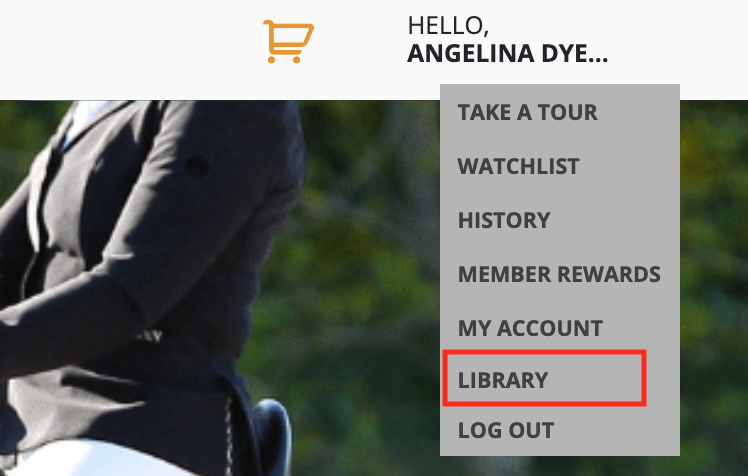
After you have bought access to your live event you can click on this link. Alternatively, you can access it from your library by doing the following:

  1. Log into your account here: https://horseandcountry.tv/login/.
  2. Navigate to your name in the top right-hand corner where it says “Hello”.
  3. Click on “Library”.
  4. You should see the Chedington Bicton Park 5* Horse Trials available to watch for 90 days. 

How do i become a member or upgrade my subscription?

To purchase a H&C+ Monthly, H&C+ Annual or H&C+ Gold subscription please visit the subscribe page here: https://horseandcountry.tv/subscribe/ and select your plan type.

Once you have purchased your subscription, please log in and visit the Elite Eventing Channel to purchase your discounted Weekend Pass.

For any questions not answered here, please contact our support team on support@horseandcountry.tv